For a long time, online privacy was largely believed to depend on a properly configured VPN. According to this view, hiding an IP address or replacing it with an address associated with another country should have been sufficient for a user to remain anonymous online. However, modern tracking and security technologies show that anonymity cannot be ensured merely by changing an IP address.
Even when a user connects to the internet through a VPN using an IP address associated with another country, the fact that advertising platforms still display ads aligned with the user’s interests, banking systems request additional verification when a login occurs from an “unfamiliar” browser and websites recognize the user again is not accidental. One of the main reasons for this process is digital fingerprinting.
Unlike cookies, digital fingerprinting is not a separate file stored in the browser. This technology is based on the collection of various technical attributes related to the user’s device, browser, network environment and behavior and on the creation of a unique profile through the combination of these attributes. As a result, even if the user hides their IP address, they may still be recognized through browser and device parameters.
What is a digital fingerprint?
A digital fingerprint can be described as a unique identifier formed on the basis of a user’s browser and device settings. This identifier may consist of numerous attributes, including HTTP headers, User-Agent, Accept-Language, screen resolution, operating system language, installed fonts, graphics card (GPU), sound card, time zone, browser window size, as well as typing speed and mouse movement patterns.
Each of these attributes, taken individually, does not make a user unique. There are many people worldwide using the same operating system, the same browser and similar devices. However, when these data points are analyzed together, they can form a sufficiently accurate profile to distinguish one user from others.
For this reason, even if a user deletes cookies, uses incognito/private browsing mode or connects through a VPN, the device and browser may still be recognized. In this sense, a digital fingerprint resembles a physical fingerprint: it is difficult to erase completely and changing it may often appear unstable or suspicious.
At the same time, this technology is not used for a single purpose only. Banks, payment systems and e-commerce platforms also use digital fingerprints for anti-fraud, bot detection and strengthening account security.
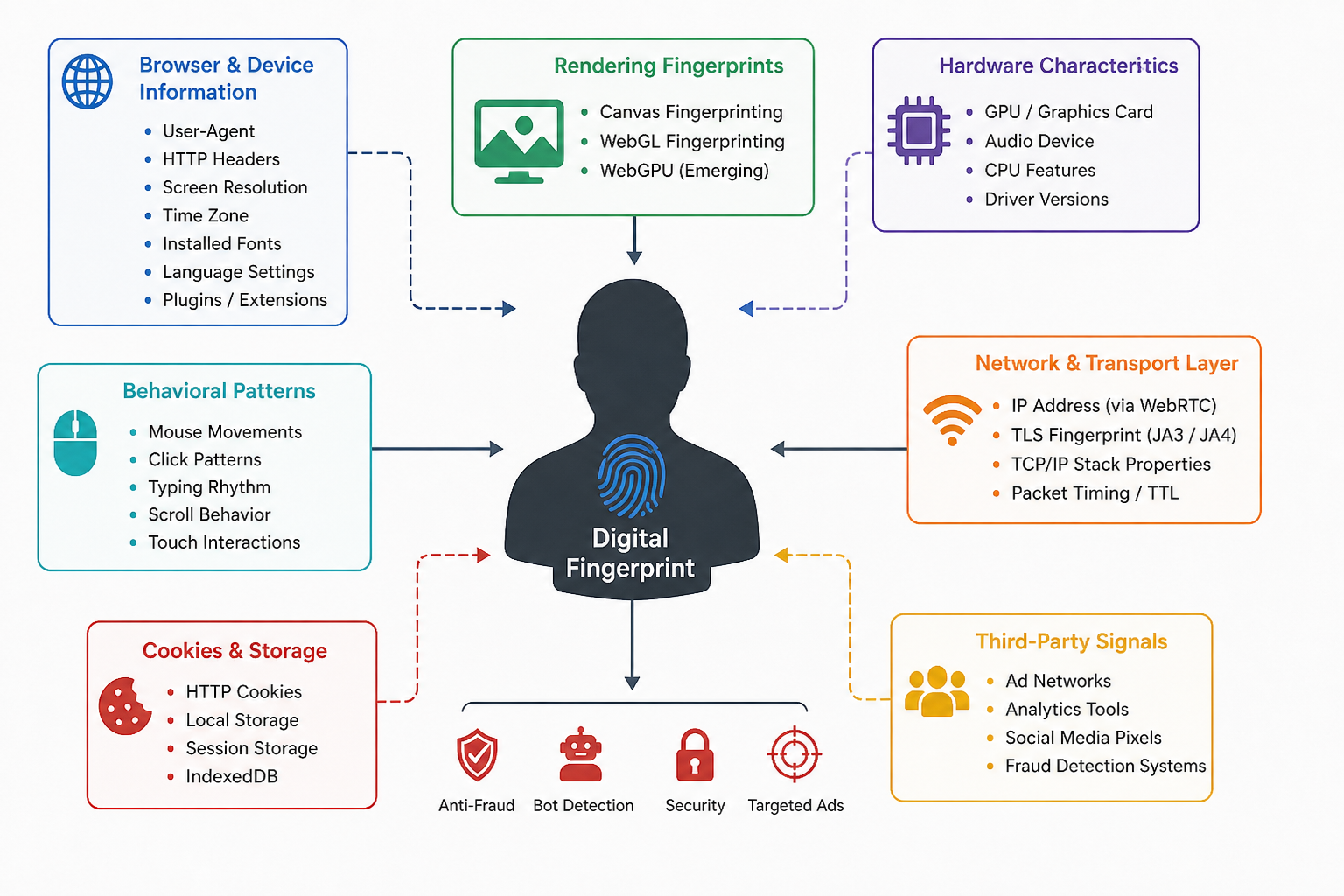
Canvas and WebGL: the hardware trace behind the browser
One of the most commonly used methods is Canvas fingerprinting. In this technique, a website creates an invisible Canvas element, draws text and graphical content on it and then reads the resulting pixels. The same image is rendered with very small differences across different operating systems, graphics cards, drivers and font sets. These differences may be invisible to the human eye, but at the software level they can be converted into a hash value and used as a stable identifier.
WebGL fingerprinting operates at a deeper technical level. WebGL enables the browser to process 3D graphics through the graphics card. In this case, not only browser parameters but also the behavior of the actual hardware is taken into account. GPU architecture, driver version, shader execution and floating-point precision may produce small but stable differences.
In more advanced approaches, not only the rendering result but also the execution time is measured. For example, the browser may run certain shader tasks and measure how long the graphics card takes to process them. Even two graphics cards of the same model may produce different results at the microsecond level. These differences may be related to temperature, manufacturing variations, driver characteristics and the current state of the system. Therefore, in some cases, WebGL fingerprinting may distinguish not only the device model but also the specific device itself.
Fonts, plugins and audio fingerprinting
Through CSS and JavaScript, it is possible to infer which fonts are installed on a system. The browser attempts to display text in a specific font; if that font is not available on the system, the text is displayed using another font. This difference can be measured to obtain information about the fonts available on the user’s device. By testing dozens of fonts, a font list specific to the user can be formed. This attribute has particularly high entropy on desktop devices.
Plugins, browser extensions, WebRTC support and the presence of ad blockers are also used as additional signals. Even the absence of any plugins may become an attribute that distinguishes the user.
Audio fingerprinting is a less widely known but technically interesting method. In this approach, an audio signal is generated through the Web Audio API, processed and then the small distortions in the resulting output are analyzed. Due to differences in sound cards, drivers and processors, the same signal may produce different results on different devices.
WebRTC, behavior and network-level traces
WebRTC is a technology used to establish direct audio and video communication between browsers. In some cases, the way this technology operates may lead to the exposure of the real IP address. For a person using a VPN, this creates an additional privacy risk. Although modern VPN services and browsers attempt to prevent WebRTC leaks, this technology is still considered an important signal source in the context of tracking.
User behavior may also become part of the digital fingerprint. Mouse movements, intervals between clicks, scrolling speed, typing rhythm and touch behavior can be analyzed. Human behavior is naturally irregular and has individual patterns. In bots, however, movements are either excessively smooth or statistically unrealistic. For this reason, anti-bot systems widely use behavioral fingerprinting.
Additional traces also exist at the network level. During the TLS handshake, the set of supported cipher suites, protocol versions and the order of extensions create a specific technical fingerprint. Historically, JA3 fingerprinting was used for this purpose, while more recently JA4 fingerprinting has been applied as a more resilient approach. These attributes help distinguish browsers, TLS libraries, proxies and certain automated tools.
Additional indicators also exist at the TCP/IP level. Examples include window size, TTL, retransmission behavior and the characteristics of the operating system’s network stack. Although these parameters do not create a unique identifier on their own, together with other signals they increase the accuracy of the digital profile.
Passive and active fingerprinting
Passive fingerprinting occurs at the HTTP request level. The server sees the IP address, User-Agent, cookies and other HTTP headers. Since these data are transmitted automatically with every request, passive fingerprinting is more difficult to detect and block.
Active fingerprinting, on the other hand, refers to the collection of additional information by a website through JavaScript or CSS code. This includes checking screen size, identifying fonts, reading Canvas and WebGL rendering results, performance measurements, sensor data and audio analysis. Active methods can provide higher accuracy, but they are increasingly restricted by modern browsers.
Limitations of the technology
Digital fingerprinting is not a flawless technology. There are two main problems: collision and fragmentation. Collision occurs when different users have the same or very similar fingerprints. For example, two people using the same laptop model, the same operating system, the same browser version and the default font set may have profiles that are very close to each other.
Fragmentation is the opposite case. A single user may appear with a different fingerprint after a minor system update, the installation of a new font or browser changes. In this case, the system may identify the same person as a different device or a different user. Therefore, modern solutions are moving away from a static hash-based approach and increasingly rely on similarity, behavior and change over time.
New techniques: WebGPU and behavioral models
As Canvas and WebGL have become widely known, research is shifting toward more subtle signals. WebGPU is considered the next stage in this regard. This technology provides lower-level interaction with the graphics processor and may reveal microscopic differences between devices more clearly.
Another direction involves timing and side-channel signals. Here, the key issue is not what result an API return, but how long the operation takes. Processor caches, scheduler behavior, temperature, system load and hardware variations may create small differences in execution time. These differences are more difficult to stabilize and fake because they are linked to the physical behavior of the hardware.
Current trends indicate that a digital fingerprint is no longer merely a static list of parameters but is evolving into a dynamic behavioral model of the device and the user. As physical, time-based and behavioral signals increase, changing such a profile will become even more difficult.
Digital footprint and digital fingerprint
A digital footprint is the broad, often public trail of data you intentionally or unintentionally leave behind (posts, browsing history). A digital fingerprint is a narrow, unique identifier composed of specific device configurations (browser, IP address) used to identify you. Both are used to track user activity, but footprints focus on behavior, while fingerprints focus on device authentication and tracking.
 07 April 2026
 04 March 2026
 20 February 2026
 12 February 2026
 28 December 2020
 05 December 2020
 05 December 2020
 05 December 2020








© 2011-2026 All rights reserved